

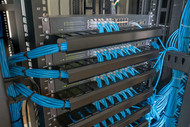
5 Signs Your Network Rack Needs Better Airflow
Posted by Tim Houghton, Senior Product Line Manager at Infinite Electronics on Jun 1st 2026
Heat is one of the biggest threats to network equipment performance and longevity. Whether you manage a home lab, prosumer setup, media cabinet, or small business network, poor airflow inside a rack can quietly create problems that lead to instability, shutdowns, and hardware failure over time.
Many airflow issues start small and gradually worsen as additional equipment, cables, and power demands are added to the rack. Without proper ventilation and cooling, heat becomes trapped inside the enclosure, reducing efficiency and placing constant stress on sensitive electronics.
Recognizing the warning signs early can help prevent expensive downtime and extend the lifespan of your equipment.
Key Takeaways
- Overheating equipment is often the first sign of poor rack airflow
- System slowdowns and random shutdowns may indicate heat-related performance problems
- Cable clutter can block airflow paths and trap heat inside the rack
- Enclosed racks require proper ventilation and cooling support
- High-density setups generate more heat and require additional airflow planning
- Fans, vented panels, and airflow accessories help maintain safe operating temperatures
1. Your Equipment Feels Excessively Hot
One of the clearest signs of poor airflow is equipment that consistently feels unusually warm during normal operation.
Switches, routers, NAS devices, servers, UPS systems, and PoE equipment naturally generate heat, but excessive temperatures often indicate that warm air is not escaping efficiently from the rack.
Signs of overheating may include:
- Hot exterior chassis surfaces
- Loud or constantly running internal fans
- Thermal warning notifications
- Reduced equipment responsiveness
Over time, elevated temperatures can shorten hardware lifespan and increase the likelihood of unexpected failures.
Proper rack airflow helps maintain safer operating temperatures and improves long-term reliability.
2. You’re Experiencing Random Slowdowns or Shutdowns
Heat-related performance issues are more common than many users realize.
When network equipment overheats, systems may automatically throttle performance or shut down entirely to prevent hardware damage.
Common symptoms include:
- Unexpected reboots
- System instability
- Network interruptions
- Reduced processing performance
- Intermittent connectivity problems
These issues often become worse during periods of heavy workload or warmer ambient room temperatures.
Improving airflow can help stabilize system performance and reduce thermal stress on hardware components.
3. Cable Clutter Is Blocking Airflow
Poor cable management is one of the most overlooked causes of restricted airflow inside network racks.
Large bundles of tangled or poorly routed cables can block ventilation paths and trap warm air around equipment.
Cable congestion commonly creates:
- Reduced airflow efficiency
- Hot spots within the rack
- Difficult maintenance access
- Increased dust accumulation
Organized cable routing improves both cooling performance and rack accessibility.
Dedicated cable management accessories help reduce clutter while simplifying future upgrades and maintenance.
4. Heat Is Getting Trapped Inside the Rack
Enclosed racks without proper ventilation often retain heat instead of dissipating it effectively.
This is especially common in:
- Wall-mounted cabinets
- Compact AV installations
- Home lab environments
- Small network closets
Without sufficient airflow, warm air continuously circulates inside the enclosure, causing internal temperatures to rise over time.
Ventilation improvements may include:
- Built-in fan systems
- Active cooling accessories
- Vented panels
- Improved equipment spacing
Fan and cooling accessories help maintain safer temperatures and improve airflow consistency.
Some wall-mount cabinets also include integrated cooling support to improve airflow in compact environments.
Some wall-mount cabinets, including the Basic Series and Consumer Series models, include integrated fan systems designed to improve airflow in compact environments.
5. Your Rack Is Near Maximum Capacity
As racks become more densely populated, airflow management becomes increasingly important.
Additional equipment means:
- More heat generation
- Less open airflow space
- Higher cooling demands
- Greater thermal concentration
High-density environments require careful airflow planning to maintain safe operating temperatures across all devices.
Simple improvements such as vented shelving, spacing optimization, and active cooling can significantly improve thermal performance in crowded racks.
Proper rack shelves can also improve flexibility, airflow, and equipment organization in high-density environments.
Why Airflow Planning Matters Long Term
Poor airflow does not always create immediate problems. In many cases, heat-related wear builds gradually over time until hardware failures begin appearing more frequently.
Long-term airflow issues can contribute to:
- Reduced equipment lifespan
- Increased maintenance costs
- More frequent downtime
- Higher fan noise levels
- Lower overall system reliability
Building proper airflow management into the rack from the beginning helps create a more stable and scalable environment.
Well-designed rack layouts also simplify maintenance and future upgrades as network demands grow.
Additional rack ventilation strategies can further improve long-term cooling performance and support a more efficient IT setup in both home and professional environments.
Protect Your Equipment from the Heat
Airflow plays a critical role in maintaining reliable network performance and protecting valuable equipment from long-term thermal damage. By identifying airflow problems early and improving cooling strategies, users can reduce downtime, improve efficiency, and extend the life of their hardware.
Whether you manage a home lab, edge deployment, or growing network environment, proper ventilation and cable organization help create a cleaner, cooler, and more reliable rack setup.
Protect your equipment from the heat.
Frequently Asked Questions (FAQs)
Why is airflow important in a network rack?
Proper airflow helps regulate equipment temperatures, reduce thermal stress, and improve overall hardware reliability and lifespan.
How do I know if my rack has poor airflow?
Common signs include overheating equipment, loud fans, random shutdowns, cable congestion, and excessive heat trapped inside the enclosure.
Can cable clutter affect cooling performance?
Yes. Poor cable organization can block airflow pathways, trap heat, and reduce ventilation efficiency inside the rack.
Do wall-mount cabinets need cooling fans?
In many enclosed environments, yes. Cooling fans help improve airflow and maintain safer operating temperatures, especially in compact or high-density setups.
What accessories help improve rack airflow?
Fans, vented panels, cable management accessories, and proper equipment spacing all help improve airflow and cooling performance.
Why do high-density racks generate more heat?
Additional devices increase power consumption and heat output while reducing open airflow space inside the enclosure.